A story about the first non-trivial software application I built and how it helped a business improve its relationship with its customers.
How It Started
Whenever my client ran online ads for his e-commerce business, interested persons call the ad hotlines to speak to Customer Service Agents (CSAs) who answered questions and helped create orders. CSAs also responded to returning customers via the same hotlines. Buyers could not order from an app because of the unpredictable logistics around inventory management.
He had an idea to improve the engagement of the CSAs with (returning) customers. He wanted an application that, on an incoming call to any of the hotlines, the customer’s details should be displayed on the screen of the Customer Relationship Management (CRM) application in less than two seconds so that CSAs can be well-informed about the caller to interact with them.
Benefits Of This Idea
Eliminate Contextual Information Loss When a Customer Speaks to Different CSAs: With this system in place, a customer can speak to different CSAs at different times and all CSAs will have the required context necessary for better engagement with the customer.
Enhance Business-to-Customer Relationship: When a customer feels that the business remembers them, it creates an emotional connection between the business and the customer. The customer doesn’t feel like a statistic or a stranger anymore, instead they feel seen, special and important.
The Project Description
Build an application that provides CSAs with (returning) customer information that can be used to interact with them before answering their call. The goal is to improve customer-brand relationship and eliminate context loss when different CSAs attend to the same customer at different times. Customer information should be provided in less than two seconds after the call comes in.
How I Built It
My first step was to take note of the expected outcomes and the constraints for the system:
- The system should be triggered on an incoming call
- The system should have read access to the phone number of the incoming call
- The system should have read access to its own customer data via customer phone number(s)
- The system should display customer information to CSAs on an incoming call in less than two seconds
These goals and constraints determined the questions I asked:
- How will the system know when there is an incoming call and also access the phone number?
- How will the system use that phone number to gain access to the customer’s profile and history
- How will the system display customer information to CSAs within two seconds?
Incoming Phone Call Triggers
I was learning Android application development with Java at that time. I found that Android had an API - the PhoneStateListener API. With the API, you could listen for incoming calls via an Android app, trigger events on incoming calls an get read access to the phone number of the incoming call.
I built an Android app that used the API to trigger events on incoming calls and access the phone number of the incoming call.
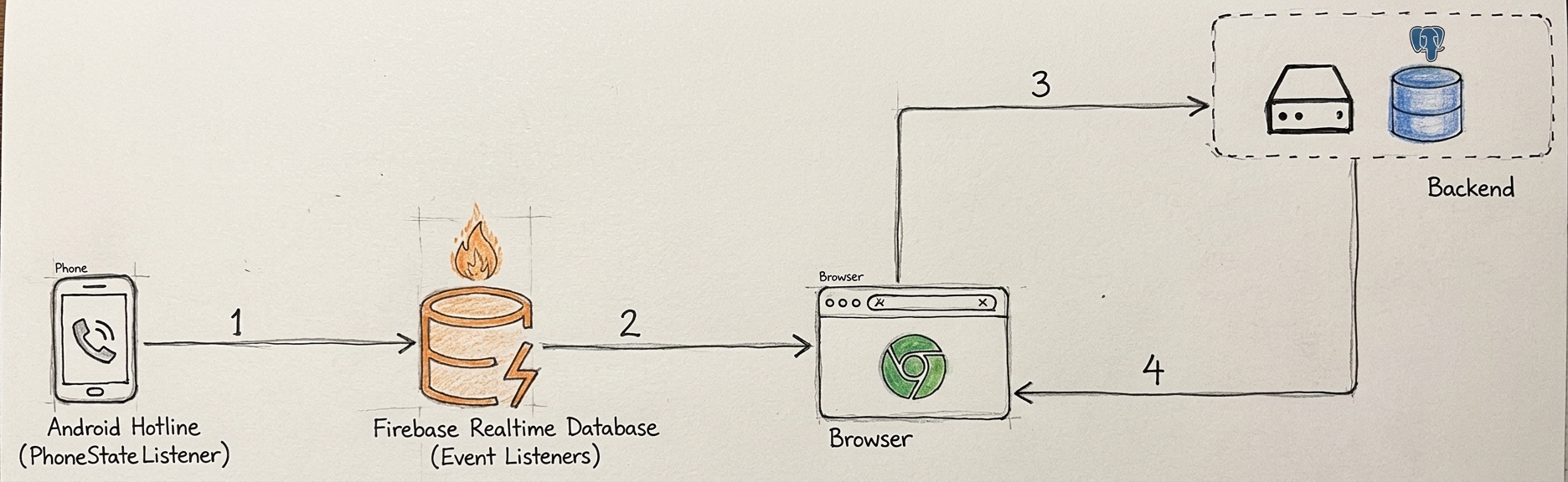
First Architecture Connecting the Phone, Firebase, the Browser and the Server
Customer Information Display
The next item was to figure out how to display customer information on the UI of a web application. I was a newbie at that time so I used the tool I knew - Firebase Realtime Database.
I connected the Android application to a Firebase Realtime Database (FRD) and set it up so that on an incoming call, the Android app updated an FRD node with the phone number of the call. Each hotline had its own node.
Next, I set up a web application, connected it to FRD and integrated FRD event listeners so that the web application listens for changes in FRD nodes. Each CSA using the web application chose the hotline they handled and made them see only updates to that hotline’s FRD node.
When a node was updated via an incoming call, the event listener on the web application received the phone number of the incoming call and made a request to fetch customer data from the server. A user could have multiple phone numbers, so the phone number column was an array column with an index for faster lookups.
Customer data fetched was displayed on the screen and CSAs could see relevant information and answer the call with “Good day Mr. Tom” instead of “Good day sir”. In cases where the caller’s information wasn’t found, the CSA was informed that the caller may be a first-timer.
Data Privacy
Data privacy was factored in from the start. I used Firebase Security Rules to ensure that customer information in FRD was not accessible by just anyone. The real customer information was in the database connected to the server. Only phone numbers were stored in FRD and they were protected from public access.
Experiences with Real Life Usage
It was a small business with less than ten CSAs at the time. It was needless to publish the app on PlayStore. I built and executable for the CSAs to install and use.
New Feature Request
The CSAs asked that a new feature should be added that allowed them include a summary of their call to the information displayed on the screen. This will provide more context for the next CSA that picks up the same customer’s call.
I executed the request by providing a speech-to-text feature on the app. The feature enabled them to easily input a summary of the call and save it to the customer’s history.
The Results
Before the application was employed for use, there used to be arguments between CSAs regarding what was discussed and concluded with the customer. The feedback provided after calls eliminated that.
Some customers rehashed past conversations which before the use of the app, was not known by the CSA attending to them. With the summary on the CSA’s screen, they could relate better.
Returning customers felt welcome when little things such as their name or questions about their last purchase or who they bought it for was mentioned during the call.
Aside from poor internet connection, one other drawback was the CSA’s ability to read and understand customer information quickly before answering a call.
Challenges with Display Times
The browser request to fetch customer information took the longest time - as high as three seconds on a bad network. The goal was for all of this to happen within two seconds. Indexing the phone number column helped bring response times closer to it - achieving times between one and two-and-a-half seconds. The other bottleneck to this goal was the speed of the CSA’s internet connection which wasn’t within my circle of control.
I recollect doing lots of tests with the network throttling feature of web browser developer tools.
How I Would Build It Today

Second Architecture Connecting the Phone, the Browser and the Server
If I should build it again today, the first thing I’d do is to replace FRD change event listeners with server-sent events (SSE). Android now uses the CallScreeningService; it would replace PhoneStateListener. There would be fewer network calls between systems, and I expect that to reduce latency - though I haven’t built this version to confirm.
On an incoming call to the Android phone, the CallScreeningService would trigger an API request containing the calling phone number to a (protected) webhook endpoint on the server. The phone number would be pushed to a background job for asynchronous processing and a response would be sent to the phone that made the API request quickly.
In the background job, the phone number would be used to query an in-memory database for the customer’s information. Customer information in the in-memory database would be stored with a least recently used (LRU) cache eviction policy, and each cache entry would be invalidated whenever a CSA writes new feedback after a call.
If the customer information is found in the in-memory database, it would be streamed to the frontend (browser) connected to the server via server-sent events (SSE). If it isn’t found, the system would query the customer table using the phone number. If found, it would stream relevant data to the frontend and also cache it. If it isn’t found, CSAs would be informed that this caller may be a first-timer.
Justification for the New System Design
SSE was chosen as the communication protocol because communication is one-way - server to client. Since it was a small company with less than ten CSAs, ten clients connected to the server via SSE will not overload the server. A setup will also be put in place to alert CSAs if their devices ever get disconnected.
The use of a background job is to respond to the client (the hotline phone) as fast as possible. The phone does not need any response payload data from the server. It also helps in scalability when there are calls to more than one hotline at the same time - since the request is pushed to a background job, the server is free to handle more requests.
An in-memory database with an LRU cache eviction policy was chosen because recent customers are more likely to call back again.
Conclusion
This was my first stab at creating a system that solved a real business problem with software engineering, even though I was a greenhorn. Every time I think about it, I’m proud of the lessons I learnt and how it made me more confident in my ability to solve problems with software engineering.
How I Would Build It Today is based on what I know today, and of course, there will be someone out there with other ideas on how to build this system.
Cheers!